
How to Set Up a 100-Seat Office in 7 Days
⚡ QUICK ANSWER
A 100-seat enterprise office can be operational in 7 days using the Expansion-as-a-Service (EaaS) managed office model. Traditional commercial leases take 6–12 months; turnkey solutions take 90–120 days. The EaaS model eliminates CAPEX, compresses the timeline to under one week, and includes fully furnished workspace, IT infrastructure, compliance readiness, and operational support from Day 1.
Your company has just won a new client contract. Or your GCC has greenlit Coimbatore as a satellite location. Or your leadership team has decided to expand operations by 100 people in the next quarter. The decision is made. Now you need an office.
Here is where most enterprises hit the wall.
A traditional commercial lease in India takes 6 to 12 months from site identification to employees sitting at desks. By the time you negotiate the lease, complete the fit-out, install IT infrastructure, handle statutory compliance, and furnish the space, the business opportunity that created the urgency may have passed.
This article breaks down exactly how a 100-seat enterprise office can go from signed agreement to fully operational workspace in 7 days — with zero CAPEX, no construction risk, and complete compliance readiness. This is not theoretical. This is the operational model that has been deployed at Innovspace across two enterprise locations in Coimbatore since 2017.
The Enterprise Office Setup Problem: Why Speed Matters
Speed is not a luxury in enterprise operations. It is a competitive weapon. Consider what happens during the months a traditional office setup consumes:
- Revenue delay: Every month without an operational office is a month of revenue-generating capacity sitting idle. For a 100-seat GCC with per-seat revenue contribution of ₹2–3 lakh annually, a 6-month delay represents ₹1–1.5 crore in unrealised revenue.
- Talent leakage: Offer letters issued without a confirmed office location create anxiety. Candidates — especially experienced mid-level professionals — drop out when joining dates keep shifting. In competitive hiring markets, a 90-day delay between offer and onboarding can result in 15–25% offer declines.
- Capital lockup: Traditional fit-outs require ₹2,500–5,000 per sqft in CAPEX — for a 100-seat office (approximately 10,000–15,000 sqft), that is ₹2.5–7.5 crore locked in leasehold improvements that depreciate the moment they are installed. This capital could be deployed toward hiring, technology, or product development instead.
- Operational complexity: Managing 8–15 vendors simultaneously (architect, contractor, furniture supplier, IT integrator, electrician, plumber, security systems, fire safety, signage, housekeeping, pantry services) creates a project management burden that most operations teams are not staffed to handle alongside their core responsibilities.
The question is not whether you can afford to set up an office quickly. The question is whether you can afford the cost of setting one up slowly.
Three Models Compared: Traditional Lease vs Turnkey vs EaaS
Enterprise office setup in India follows three distinct models. Understanding the differences is essential for making the right choice.
| Parameter | Traditional Lease | Turnkey / Managed | EaaS (Innovspace) |
|---|---|---|---|
| Timeline to occupy | 6–12 months | 90–120 days | 7 days |
| CAPEX requirement | ₹2.5–7.5 Cr (100 seats) | ₹50L–1.5 Cr | Zero |
| Lease commitment | 6–9 years (3-yr lock-in) | 3–5 years | 24 months minimum |
| Security deposit | 6–12 months rent | 3–6 months rent | Structured deposit |
| Vendor management | 8–15 vendors (tenant managed) | 3–5 vendors (provider managed) | Single provider |
| IT infrastructure | Tenant procures + installs | Included (basic) | Included (enterprise-grade) |
| Compliance readiness | Tenant responsibility | Partial support | STPI + GST + statutory included |
| Furniture included | No (tenant procures) | Yes (standard spec) | Yes (enterprise spec) |
| Scalability | Fixed (re-fit required) | Limited flexibility | Scale up/down within facility |
| SLA framework | None (lease terms only) | Varies by provider | Written SLA with credits |
| Exit flexibility | Locked (3-yr penalty) | Moderate penalty | Structured exit terms |
The EaaS (Expansion-as-a-Service) model is not simply a faster version of a managed office. It is a fundamentally different approach — where workspace becomes an operational service rather than a real estate commitment. The provider absorbs the CAPEX, manages all operational complexity, and delivers a guaranteed deployment timeline backed by contractual SLAs.
The 7-Day Timeline: Day-by-Day Deployment Breakdown
This timeline is based on the actual operational deployment sequence for a 100-seat enterprise managed office. Each day has defined deliverables, responsible parties, and verification gates.
Discovery, Scoping & Agreement
Requirements workshop with the client’s operations and IT teams. Seat count confirmed (100 seats with growth buffer). Location selected from available inventory (Aero Zone SITRA for connectivity or Edge Zone Kalapatti for BPO/KPO). Floor plan options reviewed. Commercial terms finalized. Agreement executed. Deployment clock starts.
Key deliverables: Signed agreement. Confirmed seat count and configuration. Location locked. IT requirements captured (internet bandwidth, VPN needs, server room specs, power backup requirements). Compliance requirements listed (STPI registration, GST, PF/ESI). Branding requirements noted.
Space Configuration & IT Infrastructure Planning
Operations team activates the space configuration plan. Workstation layout finalized for the specific floor plan — open desks, cabins, meeting rooms, server/comms room, pantry, and breakout areas. IT team begins network architecture design: internet circuit activation, LAN cabling routes, Wi-Fi access point placement, power distribution board configuration, and UPS capacity verification.
Key deliverables: Final floor plan approved. Workstation placement map. Network topology designed. Internet ISP activation initiated (pre-existing circuits in managed office buildings eliminate the typical 15–30 day ISP lead time). Power load calculation completed. Access control zones defined.
Furniture, Workstation & Branding Setup
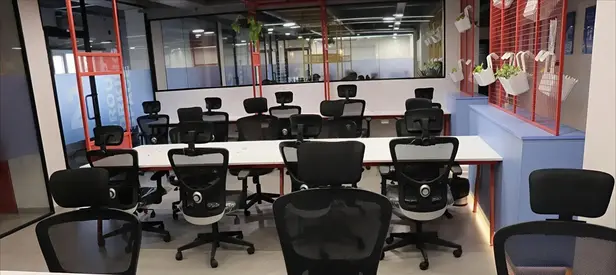
Physical workspace comes together. Ergonomic workstations deployed to confirmed layout. Executive cabins furnished. Meeting rooms equipped with AV systems (display, conferencing, whiteboard). Server/comms room fitted with rack, cooling, and power. Pantry and breakout areas set up. Client branding applied — reception signage, directional signage, glass film with logo, and welcome boards. Fire safety equipment verified and documented.
Key deliverables: 100 workstations installed and tested (chair, desk, power, LAN port per station). Meeting rooms operational (minimum 2 for 100-seat office). Executive cabins ready. Pantry equipped. Branding installed. Fire safety compliance documented.
IT Deployment, Testing & Compliance Documentation
Network goes live. Internet circuits activated and tested for bandwidth, latency, and redundancy. LAN and Wi-Fi tested at every workstation. Access control systems (biometric/card) configured for the client’s employee list. CCTV coverage verified for all common areas and entry points. STPI compliance documentation prepared. GST registration support initiated. PF/ESI establishment code application supported. Printer/scanner/copier installed and networked. Building management walkthrough for HVAC, electrical, plumbing, and elevator access.
Key deliverables: All 100 workstations with verified internet. Wi-Fi coverage map validated. Access control operational. CCTV recording. Compliance documentation package. IT infrastructure acceptance certificate prepared for client sign-off.
Final Walkthrough, Handover & Operations Go-Live
Client operations team conducts final walkthrough. Every workstation tested — power, internet, LAN, chair, desk, lighting. Meeting rooms tested — AV systems, conferencing, whiteboard. Server room verified — temperature, power, network. Access control tested for all employees on the initial entry list. Housekeeping SOP confirmed. Pantry stocked. Emergency procedures documented. Facility manager introduced as single point of contact. Handover certificate signed. Operations begin.
Key deliverables:Signed handover certificate. Operations go-live. Facility manager assigned. SLA framework activated (response time commitments for maintenance, IT support, housekeeping). 24/7 security operational. Client employees begin working.
What Makes 7-Day Deployment Possible: The EaaS Model
A 7-day deployment is not magic. It is the result of specific architectural choices that pre-solve the problems traditional office setup encounters.
Pre-built inventory, not build-to-order: The single biggest reason traditional setups take months is construction. When you lease bare shell space, everything from false ceiling to flooring to electrical wiring must be built from scratch. In the EaaS model, the workspace provider has already invested the CAPEX to build and maintain ready-to-deploy enterprise floors. The infrastructure exists before the client arrives. This eliminates the 3–6 month construction phase entirely.
Pre-provisioned IT backbone: Traditional offices require the tenant to negotiate with ISPs (15–30 day lead time), procure networking equipment, hire an IT integrator, and commission the network. In an EaaS facility, internet circuits are already active, LAN cabling is pre-installed, Wi-Fi infrastructure is in place, and UPS/power backup is operational. The deployment task reduces from “build the network” to “configure the network for this client.”
Operational team in place: The provider’s facility management team, housekeeping staff, security personnel, and maintenance crew are already employed and trained. The client does not need to hire, train, or manage any of these functions. This eliminates the HR and operational setup that typically takes 4–8 weeks in a traditional model.
Compliance framework pre-established: STPI registration, fire safety certification, building occupancy permits, and facility licenses are the provider’s responsibility in the EaaS model. The client’s compliance requirements (company-specific GST, PF/ESI) are supported with documentation and process guidance, but the physical facility compliance is already in place.
Single contract, single provider: Instead of coordinating 8–15 vendors with separate contracts, timelines, and accountability structures, the client signs one agreement with one provider who is accountable for the entire workspace experience. This collapses project management complexity from a 6-month construction programme to a 7-day deployment checklist.
The Hidden Costs of Slow Office Setup
Most cost comparisons between managed offices and traditional leases focus on the per-seat monthly rate. This misses the most significant costs — the ones that do not appear on a rent invoice.
| Hidden Cost | Traditional Lease | EaaS Model |
|---|---|---|
| Fit-out CAPEX (100 seats) | ₹2.5–7.5 Cr | ₹0 (provider’s investment) |
| Revenue delay (6-month setup) | ₹1–1.5 Cr unrealised | ₹0 (operational in 7 days) |
| Offer declines (talent leakage) | 15–25% of hires lost | Near zero (immediate joining) |
| Project management overhead | 1–2 FTEs for 6 months | Zero (provider managed) |
| Depreciation of fit-out assets | Begins immediately, 5–10yr | Not applicable |
| Exit/restoration cost | ₹30–50L restoration clause | Structured exit, no restoration |
| Opportunity cost of locked capital | ₹2.5–7.5 Cr locked for lease term | Capital freed for operations |
When you sum the visible and hidden costs, a traditional 100-seat office setup can consume ₹4–10 crore in Year 1 (CAPEX + revenue delay + talent leakage + PM overhead + deposit lockup). The EaaS model converts this entire burden into a predictable monthly operating expense of ₹4–7 lakh per month (₹4,000–7,000 per seat). The financial calculus is not just about saving money — it is about preserving optionality and deploying capital where it generates the highest return.
Enterprise Office Setup Checklist: Everything You Need
Whether you choose the EaaS model or a traditional setup, use this checklist to ensure nothing is missed. Items marked [EaaS: Included] are handled by the provider in the Expansion-as-a-Service model.
Workspace Infrastructure
- ✔ Workstations with ergonomic seating (100 units)
- ✔ Executive cabins (2–4 depending on hierarchy)
- ✔ Meeting rooms with AV (minimum 2–3 rooms)
- ✔ Server/comms room with rack, cooling, and dedicated power
- ✔ Pantry and breakout area
- ✔ Reception area with client branding
IT & Connectivity
- ✔ Internet circuit (redundant, enterprise-grade)
- ✔ LAN cabling to every workstation
- ✔ Wi-Fi coverage (enterprise-grade, full floor)
- ✔ UPS and power backup
- ✔ Printer/scanner/copier (networked)
- ✗ VPN/firewall setup
Security & Access
- ✔ Biometric/card access control
- ✔ CCTV (common areas + entry points)
- ✔ 24/7 security personnel
- ✔ Fire safety equipment + certification
- ✔ Visitor management system
Compliance & Legal
- ✔ STPI registration (for IT/ITeS)
- ✗ GST registration
- ✗ PF/ESI establishment code
- ✗ Professional tax registration
- ✔ Building occupancy certificate
- ✔ Fire safety NOC
Operations & Facility Management
- ✔ Dedicated facility manager
- ✔ Daily housekeeping
- ✔ HVAC maintenance
- ✔ Electrical and plumbing maintenance
- ✔ Pest control (monthly)
FAQs: Enterprise Office Setup
Your 100-Seat Office Is 7 Days Away
Innovspace has been deploying enterprise managed offices in Coimbatore since 2017. Two locations. Seat capacities from 50 to 500+. A single-provider EaaS model that eliminates CAPEX, compresses timelines, and delivers your office with a written SLA from Day 1.
